Tuesday, March 3, 2009

Dell and World Record Customer Support

Recently a message started appearing that told me my A/C adapter was not recognized by the system. Knowing that the A/C adapter and laptop were covered by a next-day on-side warranty, I called Dell. I carefully explained the problem: the batteries don't charge any longer, the boot-time error message, and that the green LED on the adapter seems dimmer than it should be.

The technician at Dell decided that, with this set of problems, the motherboard needs to be replaced. I asked if perhaps an adapter should be tried first... No, he assured me, that would not be the problem.

Two days later (which is service contract for "next business day service") a very friendly and helpful technician arrived, and replaced the motherboard. Same problem. He and I had a good old laugh at Dell for that, and he asked Dell to send a replacement A/C adapter.

Two days later, it arrived. No warning message! Success! But wait... now when I move the laptop it looses power for a brief moment. If there is no battery, it turns off. This was not happening before...

Calling Dell resulted in a mess. The first technician at Dell I spoke with was, to be as kind as possible, a moron. He had me run hardware tests. He had me set the brightness on the laptop LCD to full on and off battery, and since it didn't flicker anymore was fully prepared to declare the problem resolved. I slowly and carefully explained that this is a physical problem and that moving the computer at all causes it to turn off if the batteries are too low or removed.

True to the incompetence that I have come to expect from nearly every computer company's tech support, he declared that since no errors show up in the BIOS self-tests, it MUST be software. I asked to speak to his manager.

The manager declared that this was indeed a problem, part of the ongoing issue, but that I needed to ship the computer to Dell. This is because, in the mean time, my service contract has expired. They admit that while this was an on-going problem, and they will fix it, it won't be done with on-site, and that I have to ship the laptop. I called bullsh*t.

After about 20 minutes of hold-time, two agents, and over 45 minutes of on-the-phone time they finally decided that it was indeed still covered under the same warranty replacement terms as when the problem started, and they will ship another motherboard out and have it replaced again, next-day (in service-contract terms), which means to the rest of us 3 days.

So, so far, to replace a $100 A/C adapter, Dell has wasted five hours of my time and probably two to three times what the laptop is worth in service calls.

Saturday, February 28, 2009

Ruby and OpenSSL

I recently had to do some DNSSEC-type (somewhat low-level) cryptography work, and found the seeming lack of Ruby OpenSSL documentation a big pain. I found numerous examples of how OpenSSL is commonly used with PEM-encoded keys, but precious little information on low-level key loading. To save others the trouble of having to dig up some of this, I've collected some short examples of how to do low-level RSA and DSA building from a lower level than most use.

This table summarizes the variables which need to be set to use an RSA public and private key.

RSA Keys

Key TypeItemDescription
RSA PublicePublic Exponent
RSAnModulus
RSA PrivatedPrivate Exponent
RSA PrivatepPrime 1
RSA PrivateqPrime 2
RSA Privatedmq1Exponent 1
RSA Privatedmp1Exponent 2
RSA PrivateiqmpCoefficient

Thus, in order to make a working RSA public key (so the method key.public_encrypt() or key.public_decrypt() work) you must set at least n and e. For a working private key, you would need to load all of the items. Exposing any of the items marked as "RSA Private" above will cause a key compromise.

RSA Example

In this example, a 128-bit RSA key is loaded from numerical values. In DNSSEC, the public key is stored in the DNSKEY record for the zones. Don't use these numbers for real crypto; the short key length is used only to make the numbers short enough to fit in the screen width. For real work, 1024 is probably a reasonable minimum length for short-lived uses, and 2048 for longer-term use.

require 'openssl'

#
# Build a RSA public key.  We only need to load two things
# here in order to use the public key to use it to encrypt,
# sign, or verify.
#
pub = OpenSSL::PKey::RSA::new
pub.e = 65537
pub.n = 216457604585180710748301099018726389113

# At this point, this will work:
crypted = pub.public_encrypt("test")

#
# Build an RSA private key.  For the private key to work, we need
# to load the entire key, private and public components.  As we
# should have access to both, this is not really a problem.
#
prv = OpenSSL::PKey::RSA::new
prv.e = 65537
prv.d = 178210827022942698143906513631075003381
prv.n = 216457604585180710748301099018726389113
prv.p = 15294921647876231099
prv.q = 14152253249053866587
prv.dmp1 = 6806715058393856237
prv.dmq1 = 637679537428568107
prv.iqmp = 6672106206837437412

# Now we have a working private key.
puts prv.private_decrypt(crypted) # prints "test"

DSA keys

A DSA key is more or less the same, just with different variable names. It is also split into a public and private part, and the key can be loaded from individual components just as easily.

Key TypeItemDescription
DSA Publicpub_keyPublic Key
DSAqPrime 1
DSApPrime 2
DSAgMultiplicative order modulo p is q
DSA Privatepriv_keyPrivate Key

DSA Example

Unfortunately, this example has some numbers which are too long to display nicely. I have used a trick to convert them from strings into integers so they will fit here. Normally you would not need to do this.

require 'openssl'

#
# Build an DSA private key.  For the private key to work, we need
# to load the entire key, private and public components.  As we
# should have access to both, this is not really a problem.
#
prv = OpenSSL::PKey::DSA::new
prv.pub_key = ("899167044393666062859565588228279347268072456516837337" +
               "963353916587148226144760114643916732975837345856985656" +
               "3340384802383806137452386519280693373122367959").to_i
prv.p = ("952649509730281181203079535805855260554748337655197352471196" +
         "869232197576949258404031665397657842790773780623545384978542" +
         "6685417827665656974405272756289291").to_i
prv.q = 903197981571669745498020976355730183999507610553
prv.g = ("535694721480531756072717909769318961974692885092552247120424" +
         "749877864650255208980198391972633196543370921493242375015765" +
         "755160911031468160738717891191998").to_i
prv.priv_key = 557886499717422048101097620625259920363848888840

# At this point, this will work:
signature = prv.sign(OpenSSL::Digest::DSS1.new, "test")

#
# Build a DSA public key.  We only need to load two things
# here in order to use the public key to use it to encrypt,
# sign, or verify.
#
pub = OpenSSL::PKey::DSA::new
pub.pub_key = ("899167044393666062859565588228279347268072456516837337" +
               "963353916587148226144760114643916732975837345856985656" +
               "3340384802383806137452386519280693373122367959").to_i
pub.p = ("952649509730281181203079535805855260554748337655197352471196" +
         "869232197576949258404031665397657842790773780623545384978542" +
         "6685417827665656974405272756289291").to_i
pub.q = 903197981571669745498020976355730183999507610553
pub.g = ("535694721480531756072717909769318961974692885092552247120424" +
         "749877864650255208980198391972633196543370921493242375015765" +
         "755160911031468160738717891191998").to_i

# Now we have a working private key.  Verify the signature
if pub.verify(OpenSSL::Digest::DSS1.new, signature, "test")
  puts "Signature verified."
else
  puts "Signature verification failed."
end

Find conditions from params[]

I have often wished to add a trivial search capability to my controllers which would allow searching on different fields. Without getting into a mess of many different if statements each of which has a different set of conditions, I use something much like the following:

def index
  cond_hash = {}
  cond_strings = []

  if params[:search]
    cond_hash[:login] = "%#{params[:search]}%"
    cond_hash[:email] = "%#{params[:search]}%"
    cond_strings << "(login ILIKE :login OR email ILIKE :email)"
  end
  if params[:search_address]
    cond_hash[:address] = params[:search_address]
    cond_strings << "(address == :address)"
  end

  conditions = cond_strings.join(" AND ")
  @users = User.all :conditions => [ conditions, cond_hash ]
end

It may be safer to use users.login, users.email, and users.address in the SQL-like strings above.

Rails 2.0 and cool error handling

Rails is a great framework, but it has gained something of a bad reputation in terms of error reporting. Everyone has seen them -- those ugly 500-status "we're sorry, but something has gone wrong" messages.

In a finished application, this just doesn't cut it. It used to be necessary to trap the error using something like this:

def rescue_action_in_public(exception)
  case exception
  when ::ActiveRecord::RecordNotFound
    render :file => "#{Rails.public_path}/404.html", :status => 404
  else
    render :file => "#{Rails.public_path}/500.html", :status => 500
  end
end

The problem is that, as error causes begin to pile up, this method gets messy. Plus, you might want to render something different in one controller than in another, and would either need to duplicate all the logic, put controller-specific cases in the ApplicationController, or call ApplicationController::rescue_action_in_public directly.

Enter Rails 2.x error handling. Drop this in your controller or ApplicationController.

rescue_from(ActiveRecord::RecordNotFound) do |e|
  render :file => "#{Rails.public_path}/404_record_not_found.html", :status => 404
end

By building up a rich set of rescue_from handlers in the ApplicationController, and only overriding the ones you wish to make per-controller, you have fine-grained control. And they work exactly the same in development and testing as they do in production.

Thursday, February 26, 2009

Ruby Regular Expression Gotchas

I love Ruby. I love Ruby on Rails. Rarely have I found a language or a framework that just works.

However, you still have to know the finer details sometimes.

I recently made a model for a DNS zone. The name in the model is the "front part" of a fully qualified domain name. For instance, if zone.name = "foo" then I would write the name into my name server's configuration files as "foo.example.com."

Knowing that people were evil, I saw that if a user put a string in like "example.com. NS hackerz-will-someday-rule-the-earth.ru.\nfoo" I would happily write out two strings, one being rather bad.

Knowing how easy this sort of data validation is in Rails, I made my model look like:

class Zone < ActiveRecord::Base
  validates_presence_of :name
  validates_uniqueness_of :name
  validates_format_of :name,
    :with => /^[a-zA-Z0-9\-\_\.]+$/,
    :message => "contains invalid characters."
end

Happy, I ran a few tests using my browser and found that I could not insert names with spaces, colons, tabs, etc. Then, several days later, I decided it was time to write tests for this.

require 'test_helper'
class ZoneTest < ActiveSupport::TestCase
  def test_name_with_newline_fails
    z = Zone.new(:name => "test\nzone")
    assert !z.valid?
    assert z.errors.on(:name)
  end

  def test_name_with_space_fails
    z = Zone.new(:name => "test zone")
    assert !z.valid?
    assert z.errors.on(:name)
  end
end

Imagine my surprise when test_name_with_space_fails() passed, and the one I was most worried about, test_name_with_newline_fails(), did not!

Not all regular expressions are alike

The problem is in what I thought ^ and $ actually matched. I thought these meant "match the beginning and ending of the string." However, it turns out it means "match the beginning and ending of each line contained in the string," where lines are divided by newlines. Ooops.

Changing ^ into \A and $ into \Z fixed this problem. Now I'm auditing all the code in this application to see if there are other problems like this.

This is just one thing to add to an ever-growing security checklist for my Rails work. It's also a very typical security hole: programmer error.

Tuesday, February 24, 2009

Mmm, sharp knives...

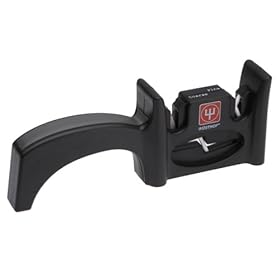
OK, so I admit it. I love sharp knives. Well, more exactly I love my knives to be sharp. So, I bought a Wüsthof knife sharpener, fully expecting it to suck. I am now happily using my knives to chop and cut, not saw, through things again. Oh, and my knives are J.A.Henckels professional "S" series.

Saturday, February 21, 2009

String#bitruncate

And that's '"bi-truncate" not "bit-uncate".

What's it do?

"This is a test".bitruncate(:length => 6) ==> "Thi...est"
"This is a test".bitruncate(:elength => 6) ==> "...a test"

The default options are { :length => 30 } which will produce 15 characters from the front and 15 from the end, putting ... marks in the middle.

For rails, I put this in my lib/core_extensions.rb file.

class String
 #
 # Truncate from both ends of a string.  The :length parameter, which defaults
 # to 30, will return the first 15 and the last 15 characters from a string
 # if it is longer than 30 characters.  If it is shorter, the entire string
 # is returned.
 #
 # Another way to specify the front and back portions are with :flength and
 # :elength.  If you specify one of these but not the other then you will
 # not get the missing part.  e.g., :flength => 10 alone will return only
 # the first 10 charcters of the string.  This is the same as the standard
 # truncate(s, :length => 10) helper.
 #
 # If a :length parameter is provided it will override any other lengths
 # specified.
 #
 def bitruncate(options = {})
   maxlength = options[:length] || 0
   flength = options[:flength] || 0
   elength = options[:elength] || 0
   omission = options[:omission] || '...'

   if maxlength == 0 && flength == 0 && elength == 0
     maxlength = 30
    end
    if maxlength != 0
      flength = maxlength / 2
      elength = maxlength / 2
    end
    
    return self if length <= (flength + elength)
    
    front = ''
    back = ''
    if flength > 0
      front = self[0..(flength - 1)]
    end
    if elength > 0
      back = self[(length - elength)..(length)]
    end
    
    front + omission + back
 end
end